TMI Simulation: Block in Halfspace#
Geoscientific Problem#
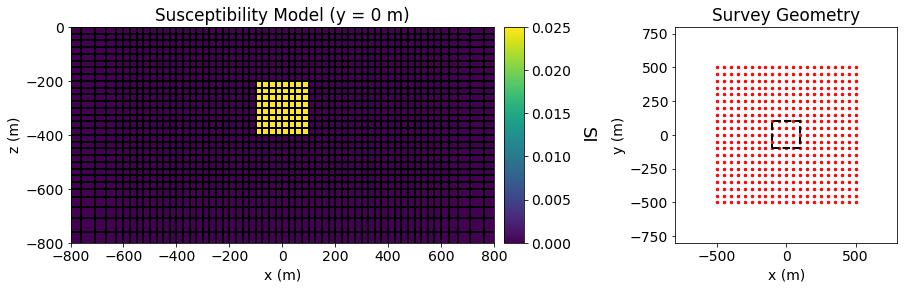
For this code comparison, we simulated total magnetic intensity (TMI) data over a susceptible block within a minimally susceptible halfspace. The background had a susceptibility of 0.0001 SI and the block had a susceptibility of 0.025 SI. The dimensions of the block in the x, y and z directions were are all 200 m. The block was buried at a depth of 200 m. The Earth’s inducing field had an inclination of 65 degrees, a declination of 25 degrees and an intensity of 50,000 nT.
Airborne TMI data were simulated at an elevation of 30 m. The survey region was 1000 m by 1000 m, the center of which lied directly over the center of the block. The station spacing was 50 m in both the X and Y directions.
A figure illustrating the susceptibility model and survey geometry is shown further down
Codes/Formulations Being Compared#
SimPEG 3D Integral Formulation: This approach to solving the forward problem uses the SimPEG.potential_fields.magnetics.simulation.Simulation3DIntegral simulation class.
UBC MAG3D v6.0: MAG3D v6.0 is a voxel cell magnetic forward modeling and inversion package developed by the UBC Geophysical Inversion Facility. This software is proprietary and can ONLY be acquired through appropriate academic or commerical licenses. The numerical approach of the forward simulation is described in the online manual’s theory section. If you have a valid license, there are instructions for reproducing the results (add link).
Loading Assets Into the SimPEG Framework#
We start by importing any necessary packages for running the notebook.
Show code cell source
from SimPEG.utils import plot2Ddata
from SimPEG.utils.io_utils import read_mag3d_ubc
from discretize import TensorMesh
import matplotlib as mpl
import matplotlib.pyplot as plt
import numpy as np

mpl.rcParams.update({"font.size": 14})
Next we download the mesh, model and simulated data for each code.
Show code cell source
# For each package, download .tar files
The mesh, model and predicted data for each code are then loaded into the SimPEG framework for plotting.
Show code cell source
rootdir = './../../../assets/magnetics/block_halfspace_tmi_fwd_simpeg/'
mesh_simpeg = TensorMesh.read_UBC(rootdir+'mesh.txt')
model_simpeg = TensorMesh.read_model_UBC(mesh_simpeg, rootdir+'model.sus')
data_simpeg = read_mag3d_ubc(rootdir+'dpred_simpeg.mag')

rootdir = './../../../assets/magnetics/block_halfspace_tmi_fwd_mag3d/'
mesh_ubc = TensorMesh.read_UBC(rootdir+'mesh.txt')
model_ubc = TensorMesh.read_model_UBC(mesh_simpeg, rootdir+'model.sus')
data_ubc = read_mag3d_ubc(rootdir+'magfor3d.mag')
Geophysical Scenario#
Below, we plot the susceptibility model and survey geometry for the forward simulation.
Show code cell source
fig = plt.figure(figsize=(14, 4))

ax11 = fig.add_axes([0.1, 0.15, 0.42, 0.75])
ind = int(mesh_simpeg.shape_cells[1]/2)
mesh_simpeg.plot_slice(
    model_simpeg, normal='Y', ind=ind, grid=True, ax=ax11, pcolor_opts={"cmap": "viridis"}
)

ax11.set_xlim([-800, 800])
ax11.set_ylim([-800, 0])
ax11.set_title("Susceptibility Model (y = 0 m)")
ax11.set_xlabel("x (m)")
ax11.set_ylabel("z (m)")

ax12 = fig.add_axes([0.53, 0.15, 0.02, 0.75])
norm = mpl.colors.Normalize(vmin=0, vmax=np.max(model_simpeg))
cbar = mpl.colorbar.ColorbarBase(
    ax12, norm=norm, cmap=mpl.cm.viridis, orientation="vertical"
)
cbar.set_label("SI", rotation=270, labelpad=25, size=18)

xyz = data_simpeg.survey.receiver_locations
ax21 = fig.add_axes([0.7, 0.15, 0.22, 0.75])
ax21.scatter(xyz[:, 0], xyz[:, 1], 6, 'r')
ax21.plot(100*np.r_[-1, 1, 1, -1, -1], 100*np.r_[-1, -1, 1, 1, -1], 'k--', lw=2.)
ax21.set_xlim([-800, 800])
ax21.set_ylim([-800, 800])
ax21.set_title("Survey Geometry")
ax21.set_xlabel("x (m)")
ax21.set_ylabel("y (m)")
Text(0, 0.5, 'y (m)')
Simulated Data Plot#
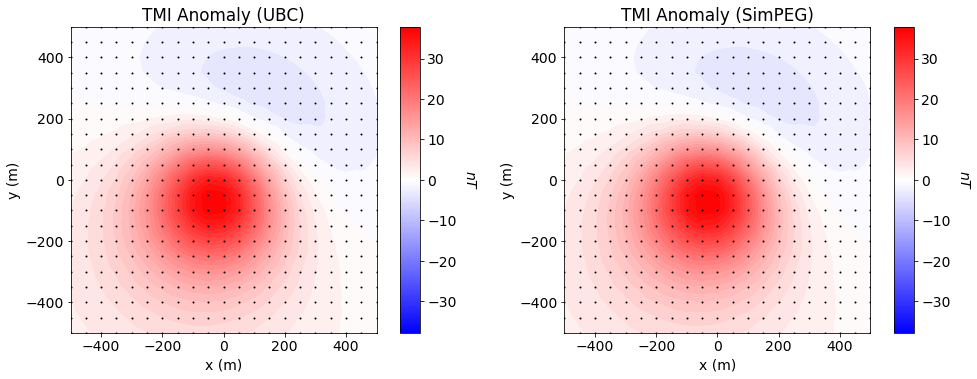
Here we plot the simulated data for all codes.
Show code cell source
xyz = data_ubc.survey.receiver_locations
dpred_ubc = data_ubc.dobs
dpred_simpeg = data_simpeg.dobs
max_val = np.max(np.abs(np.r_[dpred_ubc, dpred_simpeg]))

fig = plt.figure(figsize=(14, 5))

ax11 = fig.add_axes([0.05, 0.1, 0.37, 0.85])
plot2Ddata(
    xyz, dpred_ubc, ax=ax11, clim=(-max_val, max_val),
    dataloc=True, ncontour=50, contourOpts={"cmap": "bwr"}
)
ax11.set_title("TMI Anomaly (UBC)")
ax11.set_xlabel("x (m)")
ax11.set_ylabel("y (m)")

ax12 = fig.add_axes([0.41, 0.1, 0.02, 0.85])
norm = mpl.colors.Normalize(vmin=-max_val, vmax=max_val)
cbar12 = mpl.colorbar.ColorbarBase(
    ax12, norm=norm, orientation="vertical", cmap=mpl.cm.bwr
)
cbar12.set_label("$nT$", rotation=270, labelpad=20, size=14)

ax21 = fig.add_axes([0.54, 0.1, 0.37, 0.85])
plot2Ddata(
    xyz, dpred_simpeg, ax=ax21, clim=(-max_val, max_val),
    dataloc=True, ncontour=50, contourOpts={"cmap": "bwr"}
)
ax21.set_title("TMI Anomaly (SimPEG)")
ax21.set_xlabel("x (m)")
ax21.set_ylabel("y (m)")

ax22 = fig.add_axes([0.9, 0.1, 0.02, 0.85])
cbar22 = mpl.colorbar.ColorbarBase(
    ax22, norm=norm, orientation="vertical", cmap=mpl.cm.bwr
)
cbar22.set_label("$nT$", rotation=270, labelpad=20, size=14)

plt.show()
Error Plots#
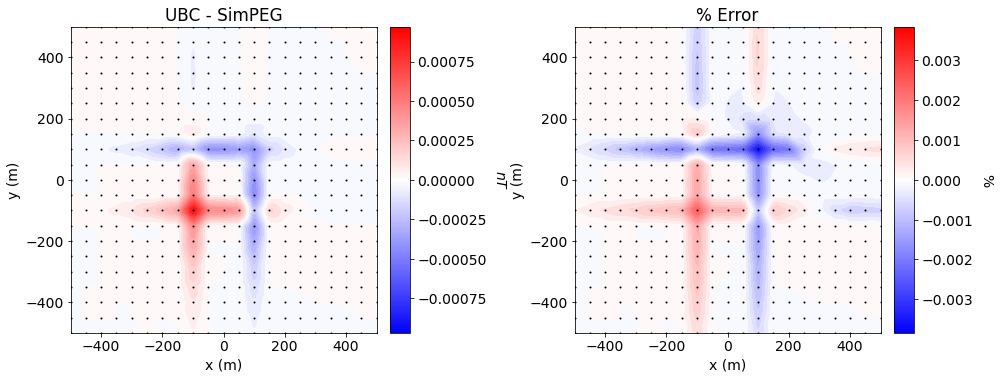
Here we plot the error and % error between the SimPEG and UBC-GIF formulations.
Show code cell source
fig = plt.figure(figsize=(14, 5))

max_val = np.max(np.abs(dpred_ubc-dpred_simpeg))

ax11 = fig.add_axes([0.05, 0.1, 0.35, 0.85])
plot2Ddata(
    xyz, dpred_ubc-dpred_simpeg, ax=ax11, clim=(-max_val, max_val),
    dataloc=True, ncontour=40, contourOpts={"cmap": "bwr"}
)
ax11.set_title("UBC - SimPEG")
ax11.set_xlabel("x (m)")
ax11.set_ylabel("y (m)")

ax12 = fig.add_axes([0.39, 0.1, 0.02, 0.85])
norm = mpl.colors.Normalize(vmin=-max_val, vmax=max_val)
cbar12 = mpl.colorbar.ColorbarBase(
    ax12, norm=norm, orientation="vertical", cmap=mpl.cm.bwr
)
cbar12.set_label("$nT$", rotation=270, labelpad=20, size=14)


tol = 1e-1
max_val = 100*np.max(
    np.abs((dpred_ubc-dpred_simpeg)/(np.abs(dpred_ubc) + tol*dpred_simpeg.max()))
)

ax21 = fig.add_axes([0.54, 0.1, 0.37, 0.85])
plot2Ddata(
    xyz, 100*(dpred_ubc-dpred_simpeg)/(np.abs(dpred_ubc) + tol*dpred_simpeg.max()),
    ax=ax21, clim=(-max_val, max_val), dataloc=True, ncontour=40, contourOpts={"cmap": "bwr"}
)
ax21.set_title("% Error")
ax21.set_xlabel("x (m)")
ax21.set_ylabel("y (m)")

ax22 = fig.add_axes([0.89, 0.1, 0.02, 0.85])
norm = mpl.colors.Normalize(vmin=-max_val, vmax=max_val)
cbar22 = mpl.colorbar.ColorbarBase(
    ax22, norm=norm, orientation="vertical", cmap=mpl.cm.bwr
)
cbar22.set_label("%", rotation=270, labelpad=20, size=14)

plt.show()