Inductive Source Simulation: Conductive Sphere#
Geoscientific Problem#
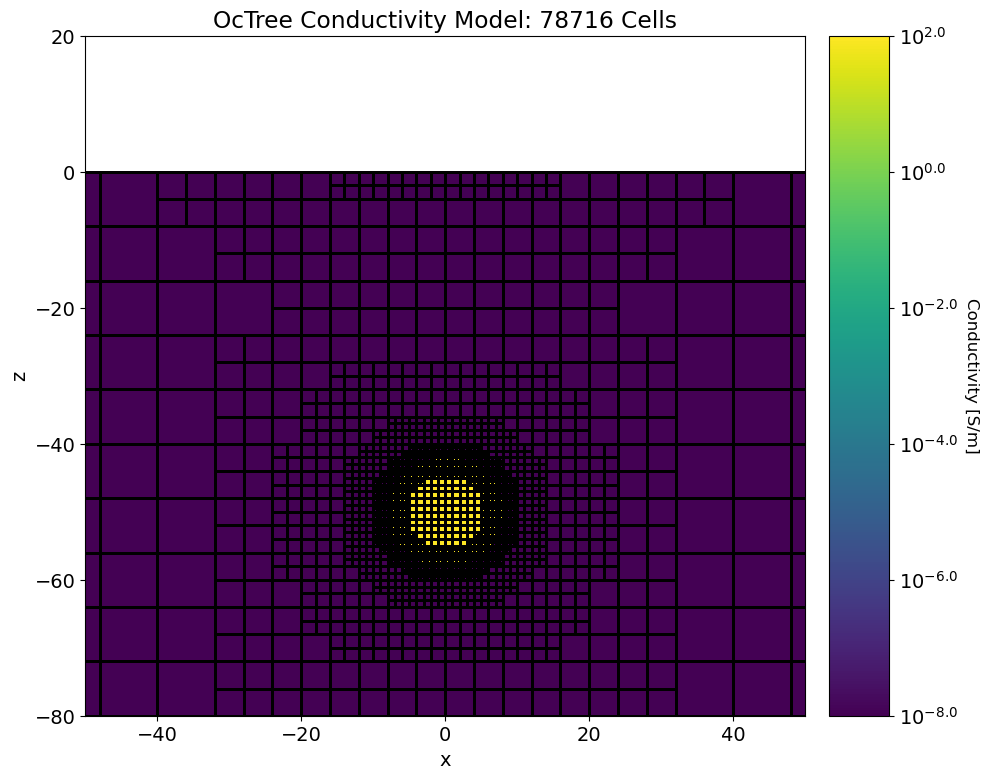
for this code comparison, we simulated the transient response from a conductive sphere in a vacuum. The sphere had a conductivity of \(\sigma\) = 100 S/m. The center of the sphere was located at (0,0,-50) and had a radius of \(a\) = 8 m.
The transient response was simulated for x, y and z oriented magnetic dipoles at (-5, 0, 10). The x, y and z components of H and dB/dt were simulated at (5, 0, 10). However, we only plot the data for horizontal coaxial, horizontal coplanar and vertical coplanar geometries.
A figure illustrating the conductivity model and survey geometry is shown further down
Codes/Formulations Being Compared#
Analytic Formulation: Wait and Spies analytic solution. See https://em.geosci.xyz/content/maxwell3_fdem/inductive_sources/sphere/index.html for a summary of the solution. Reference: J. R. Wait. A conductive sphere in a time varying magnetic field. Geophysics, 16:666–672, 1951.
SimPEG 3D OcTree Formulation:
UBC TD Octree v1: TD OcTree v1 is a voxel cell TDEM forward modeling and inversion package developed by the UBC Geophysical Inversion Facility. This software is proprietary and can ONLY be acquired through appropriate academic or commerical licenses. The numerical approach of the forward simulation is described in the online manual’s theory section. If you have a valid license, there are instructions for reproducing the results (add link).
UBC TDRH v2: TDRH v2 is a voxel cell TDEM forward modeling and inversion package developed by the UBC Geophysical Inversion Facility. This software is proprietary and can ONLY be acquired through appropriate academic or commerical licenses. The numerical approach of the forward simulation is described in the online manual’s theory section. If you have a valid license, there are instructions for reproducing the results (add link).
Loading Assets Into the SimPEG Framework#
We start by importing any necessary packages for running the notebook.
Show code cell source
import numpy as np
import matplotlib as mpl
import matplotlib.pyplot as plt
from discretize import TreeMesh
from SimPEG import maps
mpl.rcParams.update({'font.size':14})

mu0 = 4*np.pi*1e-7
times = np.logspace(-5, -2, 10)

plot_analytic = True
plot_simpeg_octree = True
plot_ubc_tdoctree_v1 = False
plot_ubc_tdrh_v2 = True
Next we download the mesh, model and simulated data for each code.
Show code cell source
# For each package, download .tar files
The mesh, model and predicted data for each code are then loaded into the SimPEG framework for plotting.
Show code cell source
rootdir = './../../../assets/tdem/sphere_vacuum_conductive_fwd'
mesh_simpeg = TreeMesh.read_UBC(rootdir+'_simpeg/octree_mesh.txt')
model_simpeg = TreeMesh.read_model_UBC(mesh_simpeg, rootdir+'_simpeg/model.con')

data_list = []
legend_str = []
style_list = ['k-o', 'b-o', 'r-o', 'g-o', 'c-o']

if plot_analytic:
    fname = '_simpeg/dpred_analytic.txt'
    data_array = np.loadtxt(rootdir+fname, skiprows=1)[:, 1:]
    data_array = np.reshape(data_array, (3, len(times), 6))
    data_list.append(data_array)
    legend_str.append('Analytic')

if plot_simpeg_octree:
    fname = '_simpeg/dpred_octree.txt'
    data_array = np.loadtxt(rootdir+fname, skiprows=1)[:, 1:]
    data_array = np.reshape(data_array, (3, len(times), 6))
    data_list.append(data_array)
    legend_str.append('SimPEG OcTree')

if plot_ubc_tdoctree_v1:
    fname = '_ubc_octree/fwd_v1/dpred0.txt'
    temp = np.loadtxt(rootdir+fname)[:, 7:]
    temp = np.c_[times, temp]
    data_list.append(temp)
    legend_str.append('TD OcTree v1')

if plot_ubc_tdrh_v2:
    fname1 = '_ubc_octree/fwd_v2_h/dpredFwd.txt'
    fname2 = '_ubc_octree/fwd_v2_dbdt/dpredFwd.txt'
    temp1 = np.reshape(np.loadtxt(rootdir+fname1)[:, -1], (3, 3, len(times)))
    temp2 = np.reshape(np.loadtxt(rootdir+fname2)[:, -1], (3, 3, len(times)))
    temp = np.transpose(np.concatenate([temp1, temp2], axis=1), (0, 2, 1))
    data_list.append(temp)
    legend_str.append('TDRH v2')
Plot Geophysical Scenario#
Below, we plot the conductivity model and survey geometry for the forward simulation.
Show code cell source
fig = plt.figure(figsize=(12,8))
ind_active = mesh_simpeg.cell_centers[:, 2] < 0
plotting_map = maps.InjectActiveCells(mesh_simpeg, ind_active, np.nan)
log_model = np.log10(model_simpeg[ind_active])

ax1 = fig.add_axes([0.14, 0.1, 0.6, 0.85])
mesh_simpeg.plot_slice(
    plotting_map * log_model,
    normal="Y", ax=ax1, ind=int(mesh_simpeg.h[1].size / 2), clim=(np.min(log_model), np.max(log_model)),
    grid=True
)

ax1.set_xlim([-50, 50])
ax1.set_ylim([-80, 20])
ax1.set_title("OcTree Conductivity Model: {} Cells".format(mesh_simpeg.nC))

ax2 = fig.add_axes([0.76, 0.1, 0.05, 0.85])
norm = mpl.colors.Normalize(
    vmin=np.min(log_model), vmax=np.max(log_model)
)
cbar = mpl.colorbar.ColorbarBase(
    ax2, norm=norm, orientation="vertical", format="$10^{%.1f}$"
)
cbar.set_label("Conductivity [S/m]", rotation=270, labelpad=15, size=12)
Plotting Simulated Data#
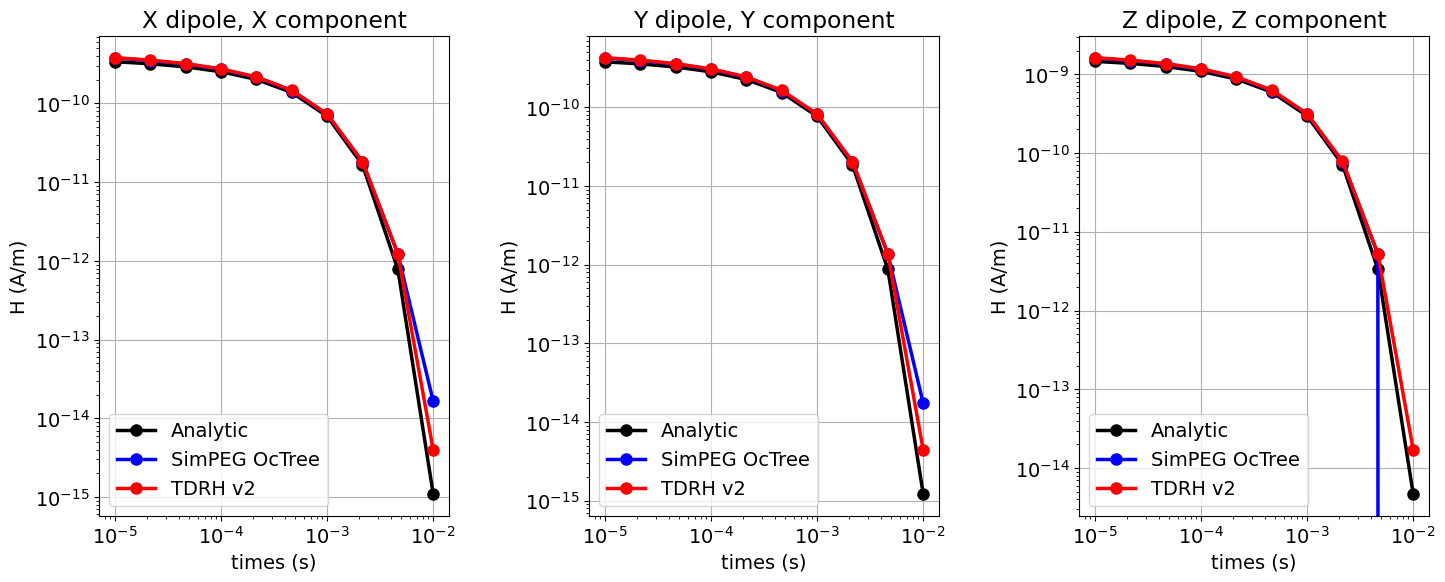
Here we plot the simulated data for all codes. We plot the only the data for horizontal coaxial, horizontal coplanar and vertical coplanar geometries.
Show code cell source
fig = plt.figure(figsize=(14, 6))
lw = 2.5
ms = 8

ax1 = 3*[None]

for ii, comp in enumerate(['X','Y','Z']):

    ax1[ii] = fig.add_axes([0.05+0.35*ii, 0.1, 0.25, 0.8])

    for jj in range(0, len(data_list)):
        ax1[ii].loglog(times, data_list[jj][ii, :, ii], style_list[jj], lw=lw, markersize=ms)

    ax1[ii].grid()
    ax1[ii].set_xlabel('times (s)')
    ax1[ii].set_ylabel('H (A/m)')
    ax1[ii].set_title(comp + ' dipole, ' + comp + ' component')
    ax1[ii].legend(legend_str,loc="lower left")
Show code cell source
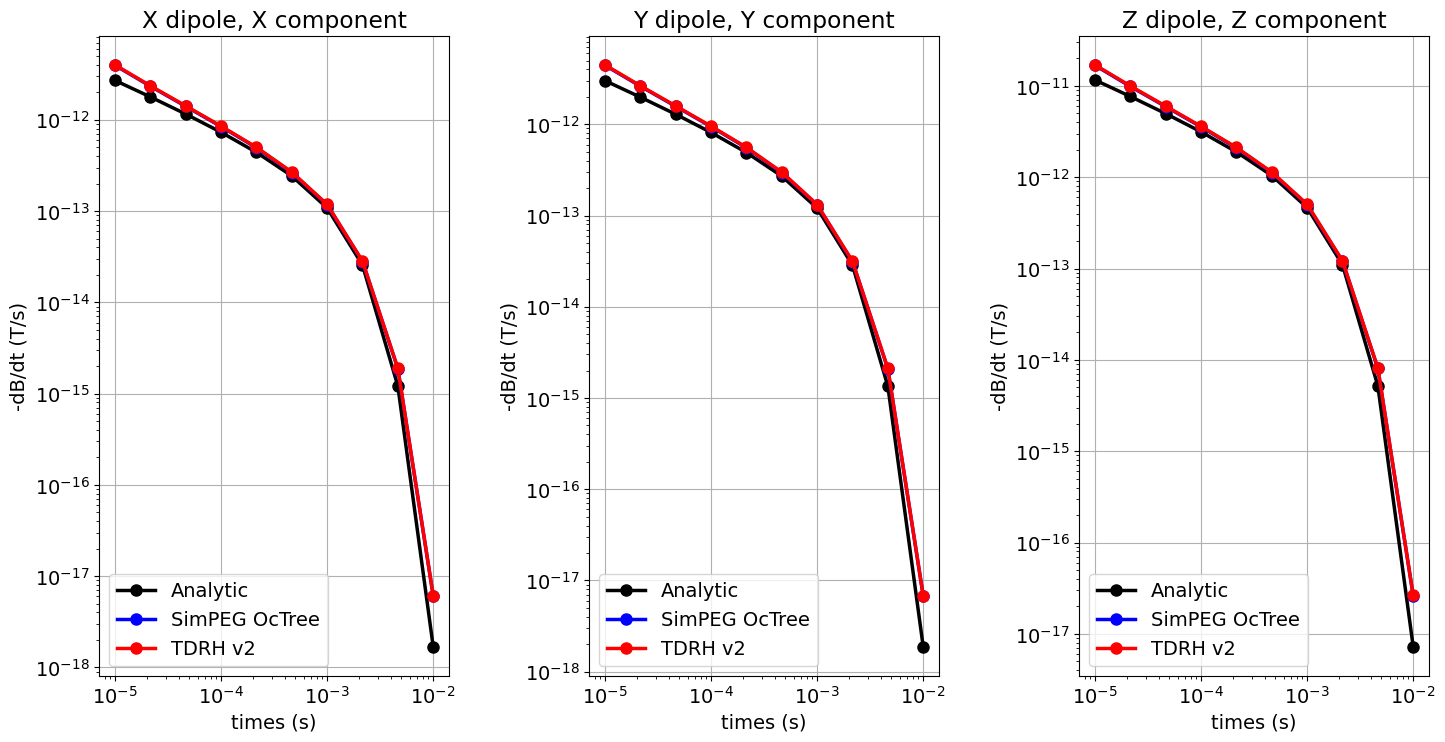
fig = plt.figure(figsize=(14, 8))
lw = 2.5
ms = 8

ax1 = 3*[None]

for ii, comp in enumerate(['X','Y','Z']):

    ax1[ii] = fig.add_axes([0.05+0.35*ii, 0.1, 0.25, 0.8])

    for jj in range(0, len(data_list)):
        ax1[ii].loglog(times, -data_list[jj][ii, :, ii+3], style_list[jj], lw=lw, markersize=ms)

    ax1[ii].grid()
    ax1[ii].set_xlabel('times (s)')
    ax1[ii].set_ylabel('-dB/dt (T/s)')
    ax1[ii].set_title(comp + ' dipole, ' + comp + ' component')
    ax1[ii].legend(legend_str,loc="lower left")